Context engineering // AI editors
Cursor Rules Best Practices: Optimizing .mdc Files to Prevent Context Bloat
Developers are stuffing Cursor, Claude Code, and Copilot instructions with giant rule bibles, then wondering why the assistant gets slower, more expensive, and somehow less accurate. Welcome to rule-induced context bloat.
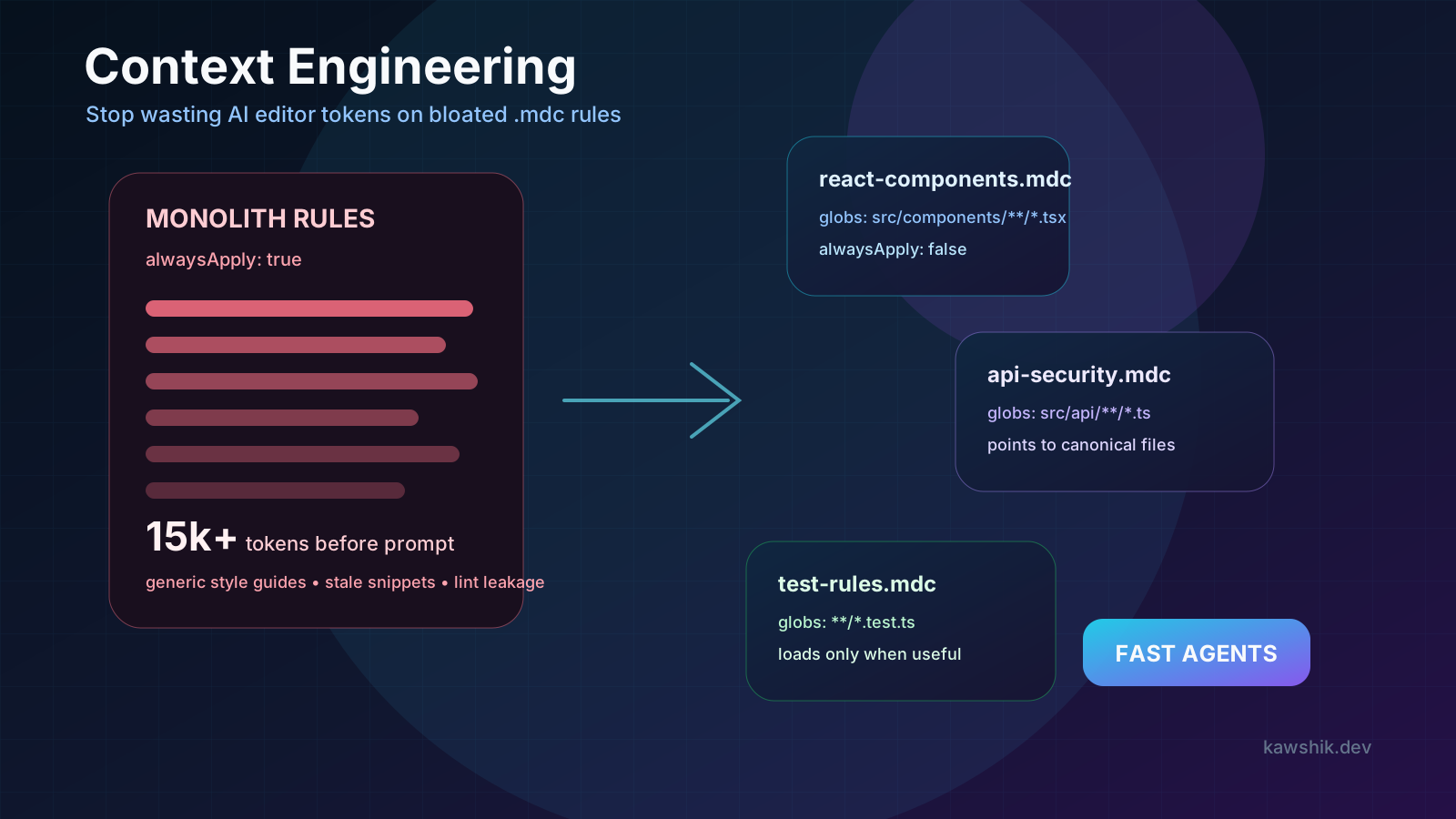
Core idea
A rule file is not documentation. It is prompt budget.
Every instruction you place in an always-loaded AI editor rule file competes with the user prompt, the open files, the error logs, the search results, and the model’s own reasoning space. Good context engineering is the discipline of making only the right context appear at the right moment.
01 // The token tax
The hidden cost of “Always Apply” rules
AI code editors are getting powerful enough that teams now treat
them like junior developers. They want the assistant to know the
stack, folder conventions, security policy, component style, test
commands, deployment flow, and every weird internal preference.
So they create a giant .cursorrules, a pile of
Cursor .mdc files, or a massive CLAUDE.md.
The intention is good. The outcome is often cooked.
If ten global rules each average 200 lines, the assistant may burn roughly 10,000 to 15,000 tokens before it even reaches the actual task. On a 128k-token window, that is close to 10% of the total space. More importantly, it consumes the high-value attention budget near the front of the conversation with instructions like “write clean code” and “use best practices.” That is not guidance. That is noise with a monthly API bill.
A 2026 study on coding-agent configuration smells found that “Context Bloat” appeared in 42% of analyzed AGENTS.md or CLAUDE.md files, while lint leakage appeared in 62%. The lesson is painfully simple: teams are paying models to reread rules their linters, tests, and type checkers already enforce deterministically.
02 // Context rot
Why bigger rule files can make AI output worse
Transformers do not treat every token as equally useful forever. When you overload the context window with stale examples, generic advice, and contradictory instructions, the model has to infer which parts matter. That increases the chance it follows a rule that was meant for a different directory, an old framework version, or a one-off migration from six months ago.
This is context rot. The rules still look authoritative because
they live in a special file, but the codebase has moved on. Maybe
your rule file says all API routes use pages/api, but
the app migrated to the App Router. Maybe it says Jest is the test
runner, but the repo now uses Vitest. The model sees both the old
rule and the new code, then tries to reconcile them like a stressed
intern in a standup.
03 // Budget
Keep global instructions under 2,000 tokens
Your global rules should be boring and short. Use them for facts
that truly apply to every task: package manager, framework version,
strict TypeScript mode, banned commands, required test command,
security boundaries, and where to find canonical docs. Claude Code
documentation gives similar guidance for CLAUDE.md:
keep instructions specific, concise, and organized, and target
under 200 lines per file.
A good global rule file should answer: “What would be dangerous or repeatedly annoying if the assistant forgot it?” It should not contain your entire component library style guide, every ESLint rule, or a 100-line example of a route handler. If a machine can enforce it, let the machine enforce it. Do not spend language-model attention on formatting trivia.
04 // Scoped activation
Use modular .mdc rules with file-specific triggers
The fix is not “delete all rules.” The fix is modular context.
Cursor’s modern rules flow supports project rules stored as
.mdc files. Instead of one monolithic brain dump, create
focused files under .cursor/rules/ and make them load
only when the work touches matching files.
---
description: "Applies when modifying React UI components."
globs: ["src/components/**/*.tsx", "apps/web/**/*.tsx"]
alwaysApply: false
---

## Component standards
- NEVER use class components.
- Use functional components and hooks.
- Keep server-only logic out of client components.
- For visual style, follow `src/components/Button.tsx`.
This rule does not need to load when you are editing database
migrations, backend workers, Terraform, or README files. With
alwaysApply: false and targeted globs, you
save thousands of tokens on unrelated tasks while still giving the
agent sharp guidance when it touches React components.
05 // Pointers
Use pointers instead of copying code into rules
The most underrated rule-writing trick is pointing to canonical
files instead of duplicating examples. Do not paste a full secure
API route into your rule file. Write: “Follow the implementation
pattern in src/api/auth/route.ts.” Do not paste a full
button component. Point to the real button component that the team
actually maintains.
Pointers stay fresh because the source of truth remains the codebase. Duplicated snippets become stale the moment someone refactors the real implementation. Claude Code’s documentation makes the same architectural distinction: persistent instructions are context, not hard enforcement. If you need enforcement, use hooks, tests, linters, type checks, or permissions. If you need guidance, keep it concise and route the agent to the right source.
06 // Audit
A practical rule-file audit checklist
Delete generic advice
Remove “clean code,” “be careful,” and style rules already covered by tooling.
Scope by path
Move frontend, backend, database, test, and security rules into separate trigger files.
Point to sources
Reference canonical files instead of duplicating long examples that will drift.
Version rules
Review rules during framework upgrades, architecture changes, and failed AI pull requests.
The best test is simple: ask whether this instruction should be in every agent session. If yes, keep it global. If it only matters for a file type, make it scoped. If it only matters for a rare workflow, make it a runbook, a command, or a skill. If a tool can enforce it, remove it from prompt context entirely.
07 // Cross-tool pattern
This is bigger than Cursor
Cursor .mdc rules are the sharpest example, but the
same discipline applies to CLAUDE.md, AGENTS.md, and
GitHub Copilot repository instructions. GitHub documents custom
repository instructions for Copilot, and Anthropic documents how
Claude loads project memories and path-scoped rules. The naming
changes, but the engineering principle does not: persistent
instructions are part of the runtime architecture of your AI
development environment.
Treat rules like code. They need ownership, review, scoping, comments for humans, and regression tests. A bad rule can waste money, slow every prompt, and quietly teach the assistant the wrong architecture. A good rule is short, targeted, observable, and easy to delete when the codebase evolves.
08 // Measurement
Measure your rule budget like production infrastructure
The easiest team ritual is a monthly rule budget review. Count the approximate tokens in always-loaded files, list every path-scoped rule, and record which rules actually changed model behavior in a useful way. If nobody can name the failure a rule prevents, delete it or move it into documentation. A rule that exists only because it feels mature is just performative YAML.
Also test rules against real tasks. Ask the assistant to modify a React component, a database migration, and a backend API endpoint. Watch which instructions appear to matter. If the React rule leaks into the migration task, the scope is wrong. If the API rule never affects API output, the wording is too vague. Context engineering becomes real engineering when rules are measurable, reviewable, and cheap to remove.
Keep a changelog for rule edits too. When a rule is added, note the bug, review comment, or production incident that justified it. Six weeks later, that note tells the team whether the rule is still a guardrail or just historical anxiety wearing a YAML costume.
09 // Final take
Context engineering is prompt engineering after it grows up
Prompt engineering was about phrasing a single request. Context engineering is about designing the information supply chain around the model. In AI editors, that means deciding what the agent sees, when it sees it, and what should be enforced by deterministic tooling instead of vibes.
If your AI editor feels slow, expensive, or weirdly confused, do not immediately blame the model. Open your rules directory. Count the always-loaded tokens. Delete the generic advice. Scope the rest. Your assistant does not need a 2,000-line constitution to write a React component. It needs the right 20 lines at the right time.
Sources // docs and research